
In our previous article, Your Website Through Google’s Eyes, we decoded the evolving landscape of SEO and how Google discovers, understands and evaluates a website. Technical SEO forms a strong backbone of that process. However, it is often treated as a standard checklist that every website needs to implement. In reality, technical SEO is contextual, and what your website needs depends on its size, complexity and technology. So, how much technical SEO does your website actually need?
It is a question that usually comes up at one of two moments: when you are about to launch or re platform a website, or when organic traffic starts to slip and you are trying to understand why. The problem is that technical SEO can quickly turn into a long list of audits, warnings and fixes. Open an SEO tool and you can end up with hundreds of things to investigate, making it difficult to know what actually matters for your website.
The answer is probably not “everything.”
A small business website does not have the same technical needs as a large e-commerce platform, a JavaScript-heavy SaaS product or a global enterprise website. What matters is whether your website has the technical foundation search engines need and whether that foundation is strong enough for the scale & complexity of the site.
The short answer: Every website needs Level 1, the technical foundation. Most marketing websites also need Levels 2 and 3, which cover site structure and performance. Levels 4 to 6 depend on how large, complex and fast-changing your website is. The rest of this article helps you work out where your site sits.
So instead of asking “Have we completed every technical SEO task? ”, a better question is: “Does our website have the technical foundation search engines need to find, understand and index the pages that matter to our business? ”
What Is Technical SEO?
Technical SEO is the part of SEO that makes sure search engines can access, crawl, render, understand and index your website. It is less about what your pages say and more about whether Google can reach and read them.
It covers:
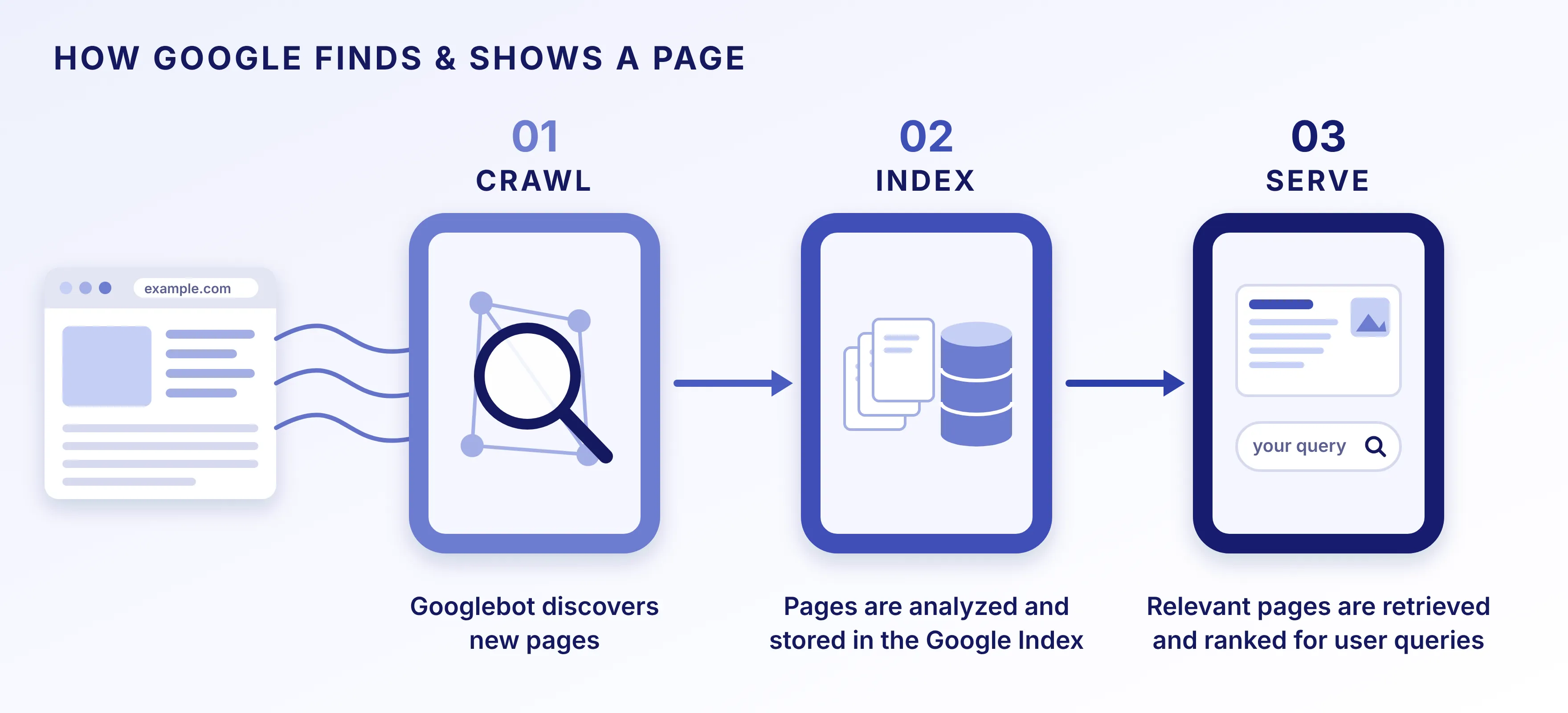
Google works in three steps: crawling (finding pages), indexing (saving them) and serving (showing the best answers). A technical problem at any step can hide a page, and great content cannot fix that. Google explains the process in its Search Central documentation.
This matters even more now that AI-generated answers are part of search. They rely on the same foundations. If your content is blocked or hard to render, it is less likely to be used.
That is why technical SEO is not a boring checklist of errors. It is about making your website easy to find, understand and keep running smoothly.
The 6 Levels of Technical SEO
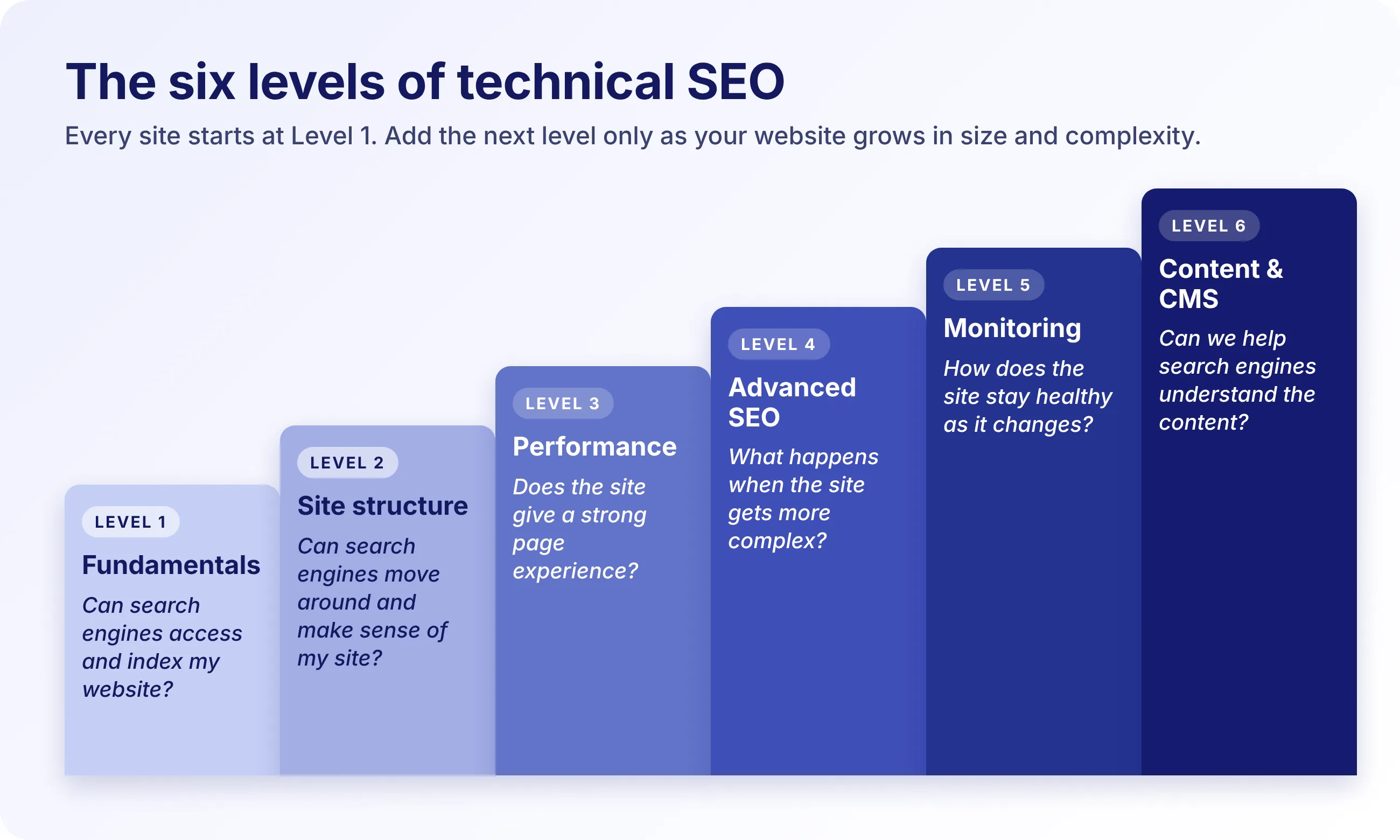
Think of technical SEO as layers, not a checklist. Level 1 is the foundation every website needs. Levels 2 to 4 add depth as your website grows, serves more countries or relies on more complex code. Levels 5 and 6 run alongside them: one keeps the website healthy over time, the other makes your CMS support it at scale.
So the levels are not a ladder. A small website may need Level 1 and a little of Level 5. A large platform may need all 6.
Level 1: Technical SEO Fundamentals
The question: Can search engines access and index my website?
This is where every website starts. Before schema, JavaScript rendering or crawl management, make sure search engines can reach the pages you want people to see. The fundamentals are:
- Robots.txt and XML sitemap: they tell search engines where to go and which pages matter.
- Indexability and canonical URLs: they make sure the right version of each page is saved.
- Status codes and redirects: they stop errors and old URLs stranding visitors and crawlers.
- HTTPS and mobile friendliness: the basics of a secure, phone-friendly website.
These sound basic, but a sophisticated website cannot make up for basic access problems. If an important service page is accidentally marked noindex, search engines will not show it. If old URLs return errors after a redesign, content that was easy to reach becomes hard to find.
Outcome: Search engines can access and index the important pages on your website.
Level 2: Site Structure & Discoverability
The question: Can search engines easily move around and make sense of your website?
Once the fundamentals work, the next question is how your website is organised. Imagine a website with 500 pages. Everyone might be allowed into Google’s index. But if your most valuable pages are buried five clicks deep or barely linked from anywhere, being indexable will not help Google find them or see that they matter.
A logical structure shows how pages relate to each other, for example Products → Category → Product → Product detail. Here is what to look at:
- Information architecture and URL structure
- Internal linking and crawl depth
- Orphan pages
- Pagination, filters and JavaScript-dependent content
Google recommends making links easy for crawlers to follow, so your most valuable pages can always be reached from other pages it already knows. The goal is not a clever maze. It is a website that is easy to navigate, understand and maintain.
Outcome: Important content is easier for search engines to discover and understand.
Level 3: Performance & Core Web Vitals
The question: Does the website provide a technically strong page experience?
A website can be crawlable and indexable and still be poor to use. It might take seconds to load. A button might feel sluggish. Text might jump just as someone starts reading. Oversized images, heavy JavaScript, unoptimised fonts and slow servers all drag performance down. This is where technical SEO and engineering naturally overlap. Google measures it through three Core Web Vitals:
- LCP (Largest Contentful Paint): How quickly the main visual element or headline appears on the screen.
- INP (Interaction to Next Paint): How quickly the page responds when someone clicks, taps or types.
- CLS (Cumulative Layout Shift): Whether things move around unexpectedly while the page loads.
Google recommends aiming for good scores on all three because they reflect real-world loading, responsiveness and stability. You can read more in Google’s Core Web Vitals guide. But performance is only one part of technical SEO. A fast website with broken indexing or inaccessible content still has an SEO problem.
Outcome: Your website provides a technically strong experience for both users and search engines.
Level 4: Advanced Technical SEO
The question: What happens when the website becomes more complex?
This is where technical SEO moves from good practice into specialised engineering. A simple marketing website may never need advanced crawl management. A large SaaS platform, an international brand or a sprawling e-commerce catalogue probably will. Complex websites bring problems smaller ones never see:
- JavaScript rendering choices: whether content is built in the browser (client-side) or on the server (server-side) changes what search engines see.
- International SEO and hreflang: tags that tell Google which language or country version of a page to show.
- Large-scale crawl management and structured data: making crawlers spend time on the pages that matter, and adding machine-readable labels that describe them.
- Complex redirects and migrations: moving CMS, URLs or domains without losing visibility.
Take example of JavaScript. Google can process it, but script-heavy websites need extra care. So the question is not “Does our website use JavaScript?” but “Does the way we use it let search engines access and understand the content we want to appear in search?”
The same goes for migrations. Changing your CMS, URLs, navigation or domain introduces risk, so redirects, canonicals, internal links and indexation should be planned as part of the migration, not fixed after it.
Outcome: Technical SEO adapts to the complexity of the website, instead of forcing a one-size-fits-all approach.
Level 5: Technical SEO Monitoring & Continuous Health
The question: How do you make sure the website stays technically healthy as it changes?
Technical SEO is not something you can finish. A website is a living system. Developers release features, the CMS gets updated, pages are added and plugins create new URLs. Each change can create a new technical issue. A new JavaScript component can change how content renders. A developer can accidentally add a noindex tag. A new filter system can generate thousands of URLs.
An audit tells you the website is healthy today. Monitoring tells you when that changes.
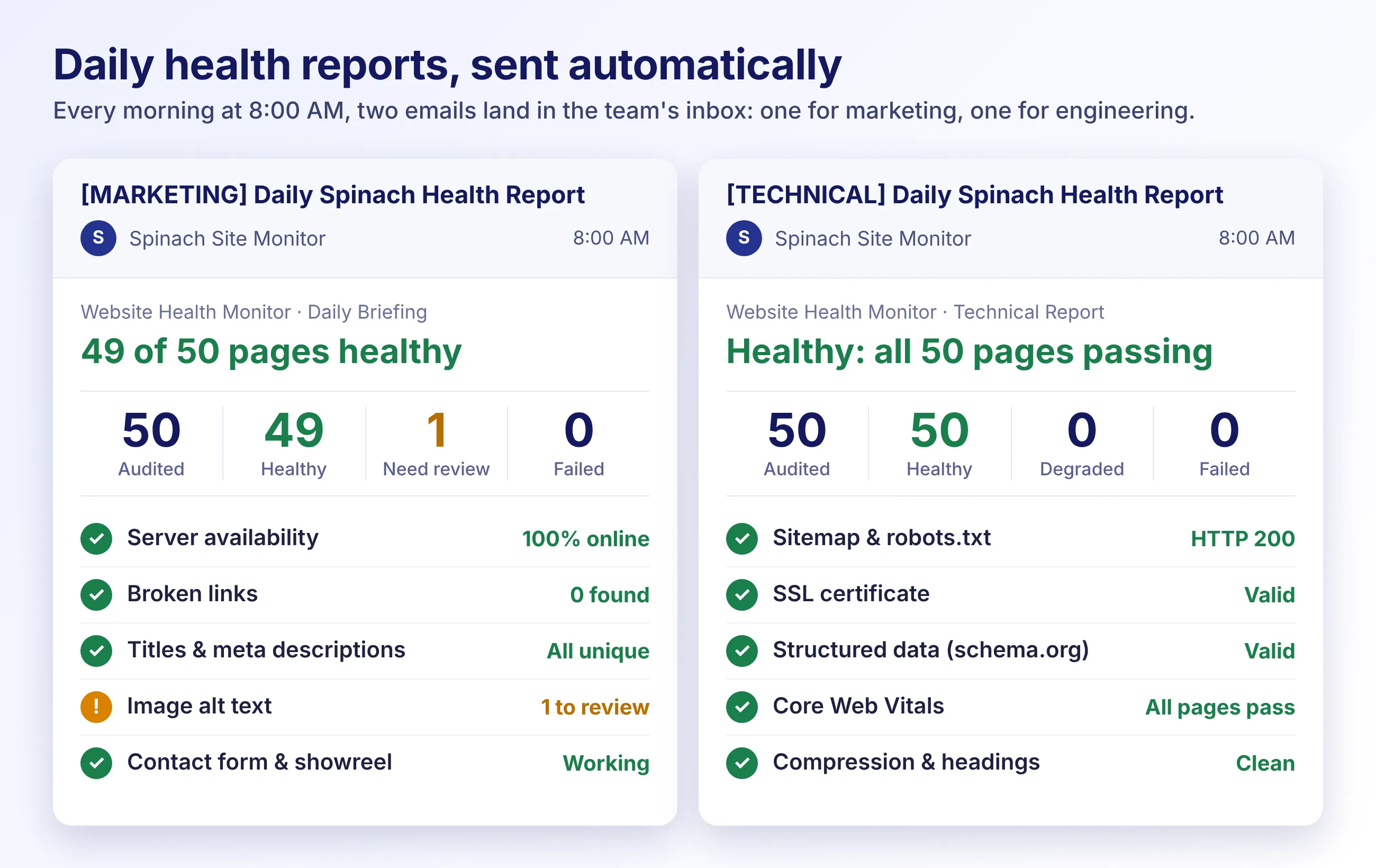
We do this on our own website. A daily automated health check runs 23 technical checks across about 50 pages, sending a short summary to the marketing team and a detailed report to the developers. It means a problem gets spotted the day it appears, not weeks later when traffic dips.
The progression is less about adding tasks and more about building a process:
SEO checklist → SEO audit → SEO optimisation → SEO monitoring → SEO automation → Continuous SEO health
The goal was never a perfect 100/100 score on a third-party tool. It is keeping your website healthy and discoverable as your product moves forward.
Outcome: Technical issues can be detected before they become larger problems.
Level 6: Technical SEO Meets Content & CMS
The question: Once the technical foundation is healthy, how do we help search engines understand the content?
Technical SEO and on-page SEO are closely connected but not the same. Technical SEO makes your content accessible. On-page SEO helps search engines understand what it is about. Level 6 is where the two meet, and the CMS makes it work.
In the CMS, that means building in heading hierarchy (H1, H2, H3), page titles and meta descriptions, image alt text and structured content fields, so the details are never skipped. On a 10-page website, updating these by hand is quick. On a 10,000-page website, the question changes:
Can the system manage these SEO elements consistently at scale?
That is where SEO starts to shape CMS architecture and templates. Instead of asking a content team to fix every page manually, you design a system that makes the right thing the easy thing.
Outcome: SEO elements stay consistent as your content grows.
Does every website need every level?
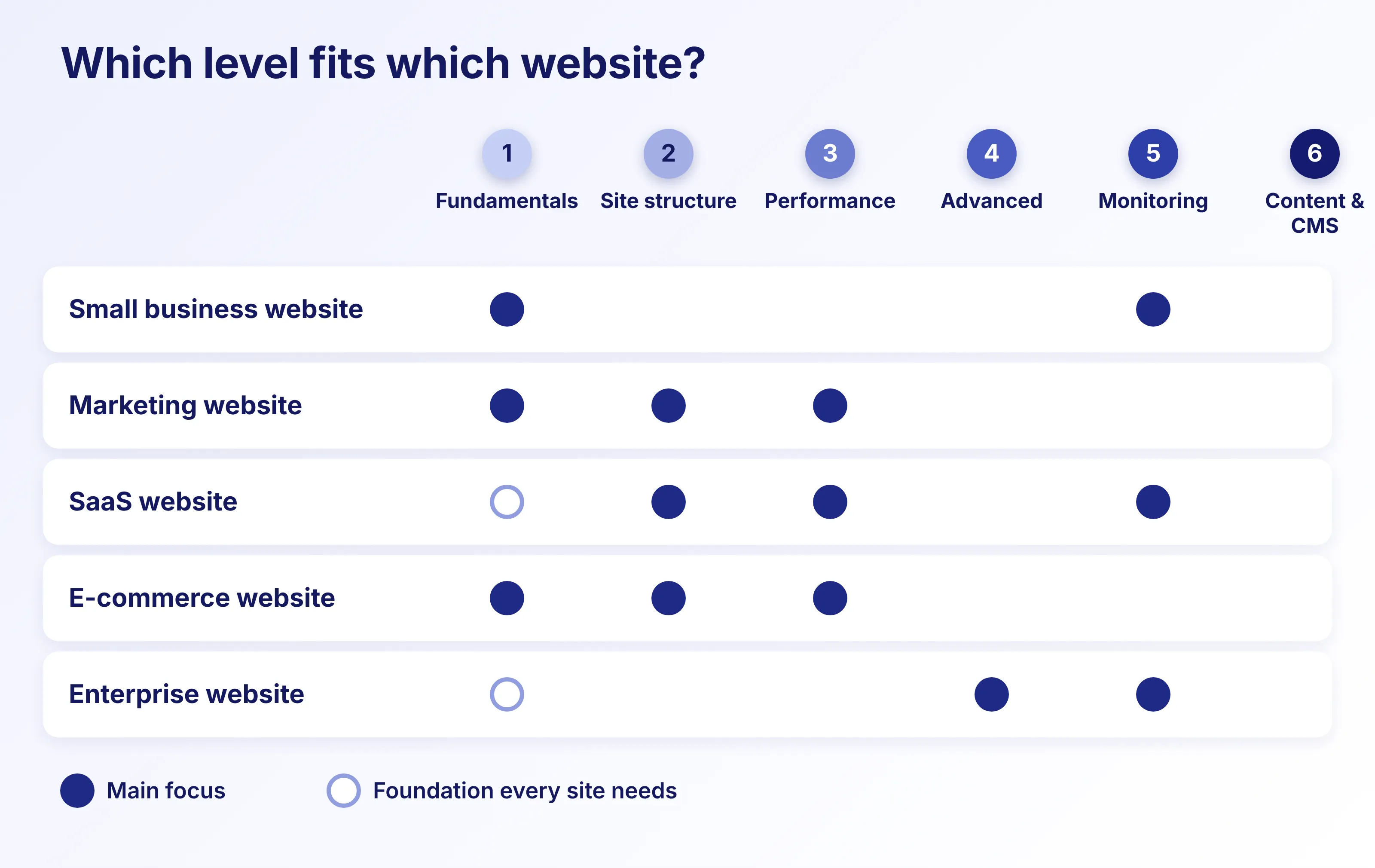
No. You do not need every advanced technique just because it exists in an SEO handbook. The right level depends on your website’s size, technology, business model and how often it changes. A simple way to think about it:
These are not strict categories. The point is that technical SEO should be proportional to the complexity of your website. What moves you up or down is the number of pages and templates, your CMS and tech stack, whether you serve more than one country, how often the website changes and how much it depends on JavaScript.
How do you know which level your website needs?
Instead of a 100-point checklist, start with a few simple questions. If your traffic has dropped, work through them in order. They double as a diagnosis.
Not sure where your website sits? Talk to us and we will tell you.
What should you fix first?
This is where many SEO audits become overwhelming. You open the report and see hundreds of warnings, and suddenly everything looks urgent. It is not. What matters is the impact on the pages and business outcomes that count. A useful order to work in as shown in the image.
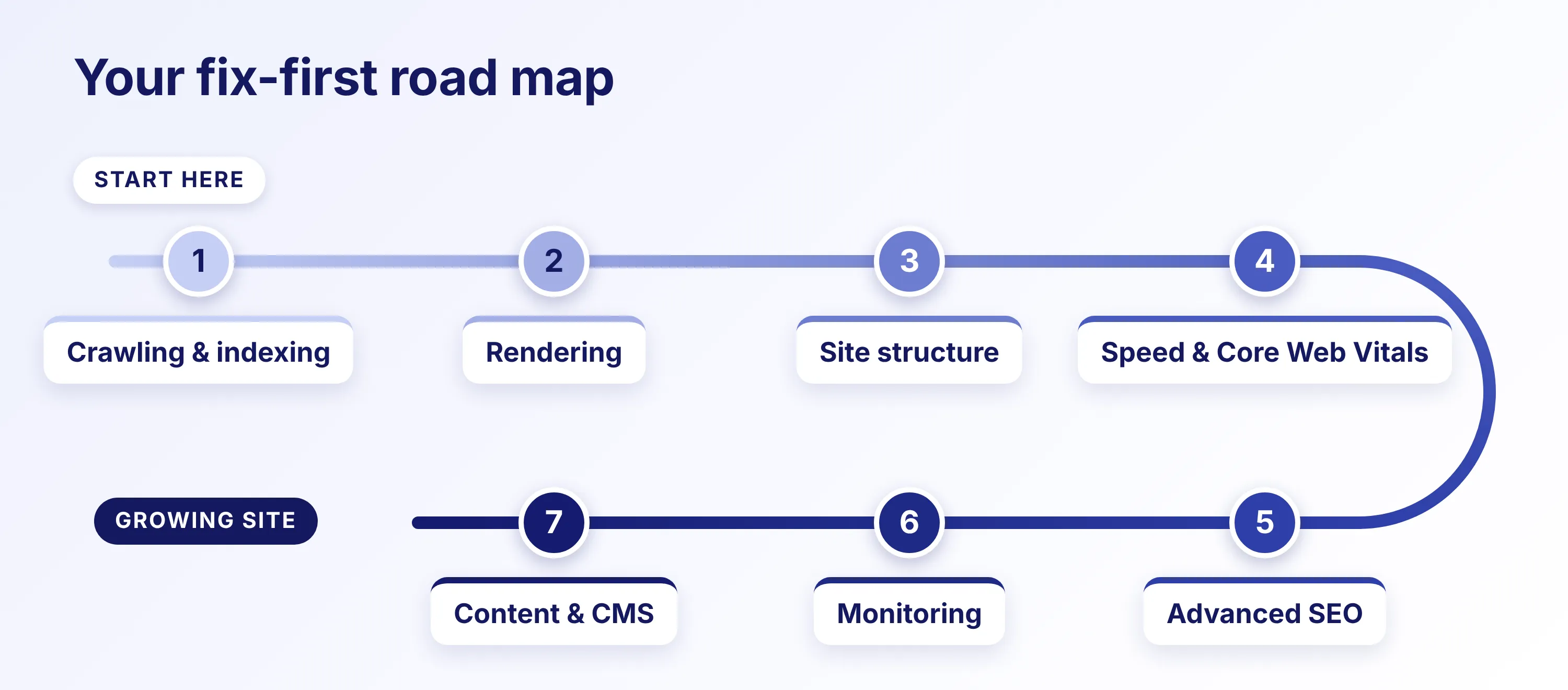
The levels describe what your website has. This order describes what to fix first. Steps 1 and 2 cover Level 1 and the rendering part of Level 4, because if search engines cannot reach or render your content, nothing after that matters. Steps 3 to 7 follow Levels 2 to 6.
It is a guide, not a rulebook. A JavaScript-heavy website may need rendering work much earlier, and a website preparing for an international migration may need to start with redirects and international structure. The principle is simple:
Fix whatever stops search engines from finding and reading your best content before you optimise the details around it.
Where Technical SEO meets design, development & content
Modern SEO cannot sit only with the marketing team. A high-performing website takes different disciplines solving different pieces of the same puzzle:
- SEO spots the blind spots, like a high-value landing page that is not being indexed.
- Engineering builds the fix, whether that is rendering, routing, templates, server configuration or the CMS.
- Design and UX protect the experience. Never hurt usability just to please a crawler.
- Content explains what the page is about and answers the user’s question.
- The CMS keeps everything consistent across hundreds or thousands of pages.
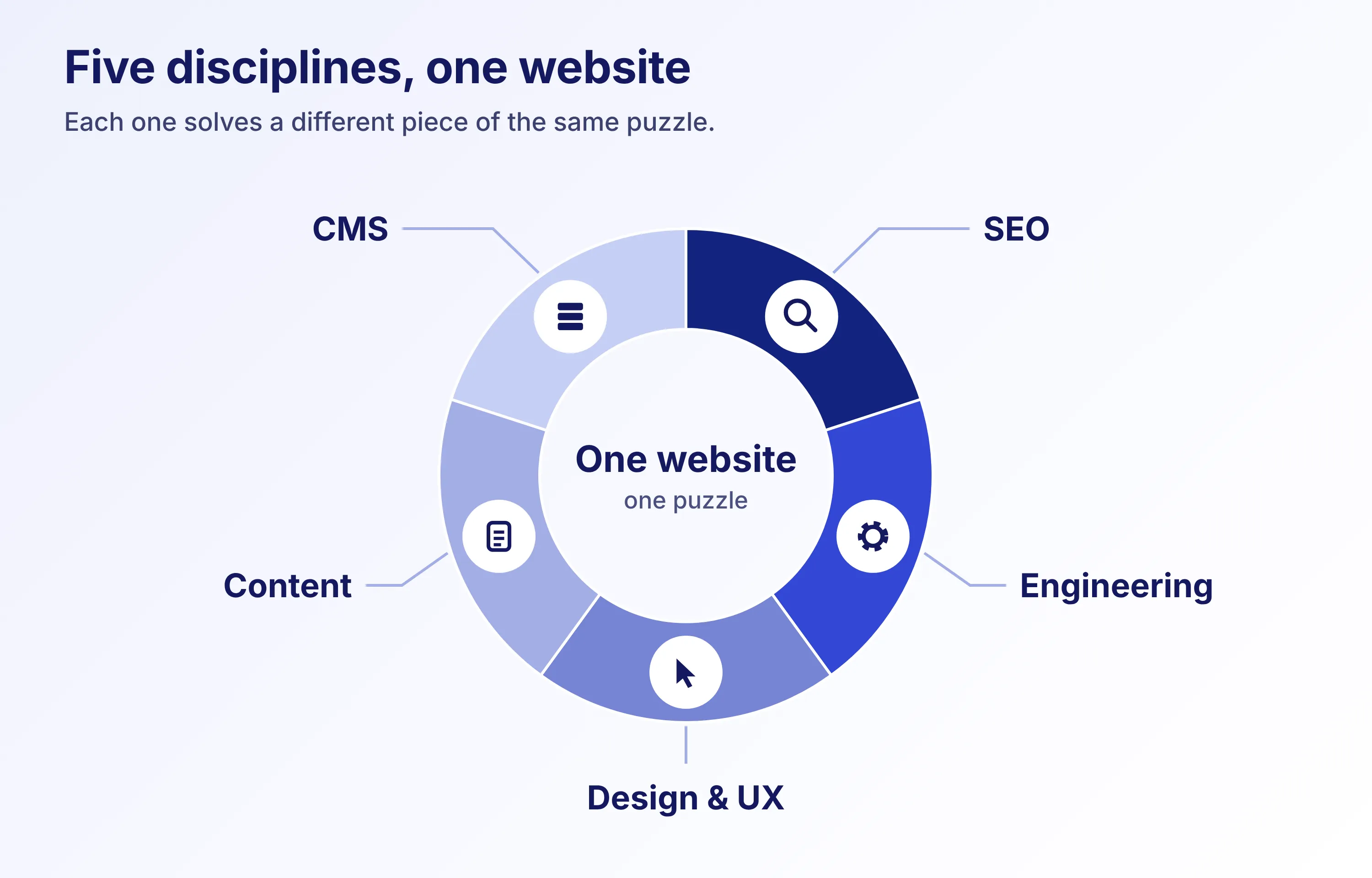
This is also how we work at Spinach, with UX and UI design and engineering in the same conversation from the start. The strongest technical SEO work often happens before launch, while architecture, templates and content systems are still being designed. It can also happen after launch, when existing problems need diagnosing.
What about a new website or replatforming?
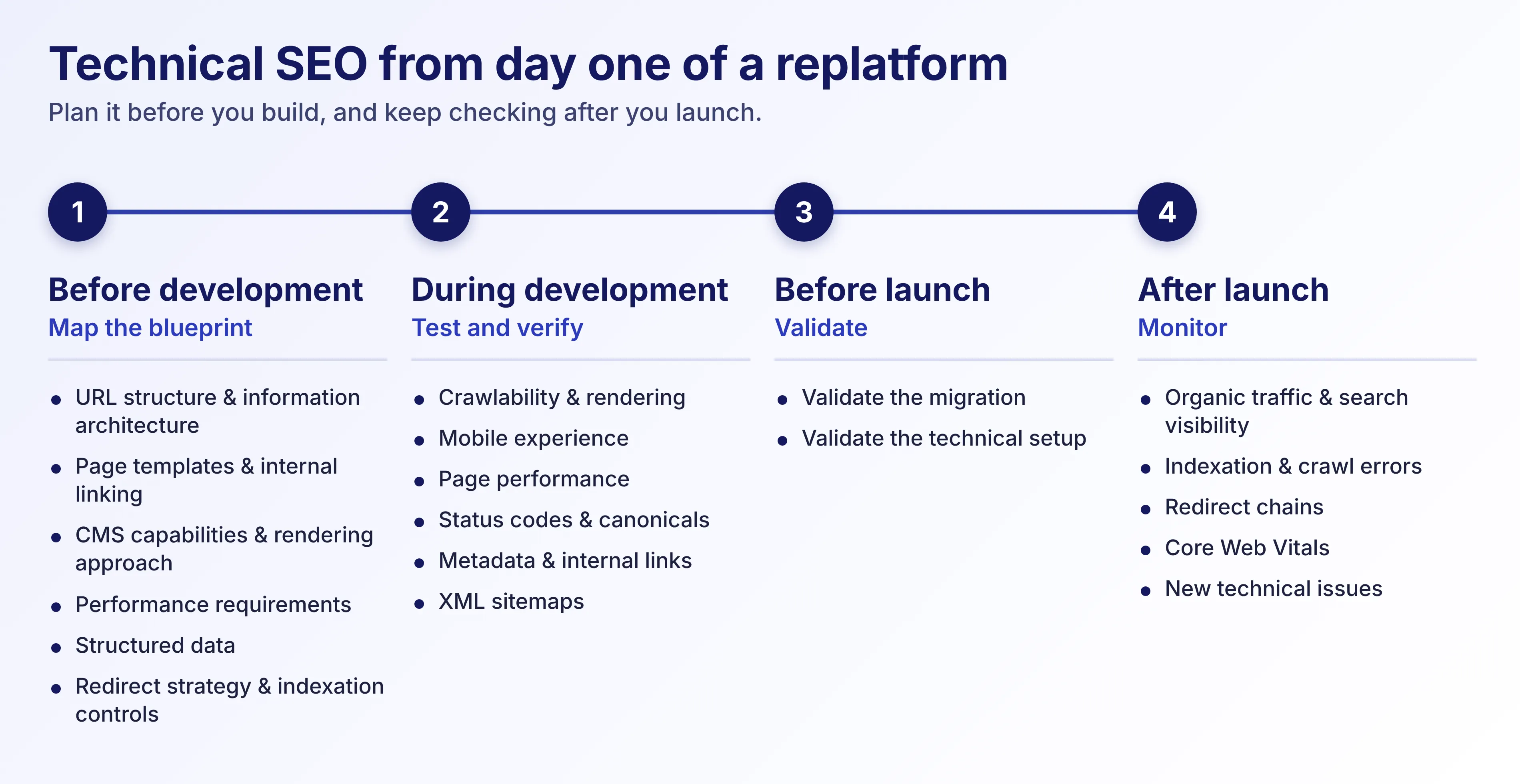
If you are planning a redesign, migration or move to a new platform, technical SEO should not be a post-launch checklist. It needs to sit at the core of the project from day one.
Google publishes detailed documentation on site moves, redirects and JavaScript for a reason. Small slip-ups here can directly affect how Search reads and values your website. The earlier technical SEO is considered, the fewer problems you retrofit later.
How much Technical SEO is enough for your website?
There is no universal answer. A 20-page company website does not need the same technical SEO system as a global e-commerce platform. The right level depends on your website’s complexity, technology, size, content and rate of change. The better question is:
“Can search engines reliably find, understand and index the pages driving our business, both today and as our site grows?”
Good technical SEO is not about making your website complicated. It is about making complexity manageable. And when SEO, design and engineering are considered together, you get a website that is easier to discover, use, maintain and grow
Is your website technically ready to grow?
If you are seeing unexplained traffic drops, planning a redesign or re platforming, or launching a new website, a technical SEO audit can show where the problem actually sits.
At Spinach, we look at technical SEO alongside design, user experience and engineering, because fixing an SEO issue often takes more than changing a meta tag.