
The vision: translating space-grade precision to the web
Digantara operates in the world of space intelligence and surveillance, tracking objects orbiting hundreds of kilometres above Earth with extraordinary precision. When they approached us to redesign their website, they weren’t looking for a simple brochure site.
The brief was simple: a modern, animation-rich, interactive website that showcases their work, products and company in a way that feels cinematic yet effortless. It had to work flawlessly on every device, from high-end desktops to older phones, with no jitter, no lag.
This is the story of how we built that experience, and what we learned along the way.
On a practical level, that translated into three core expectations, and over four months, this project became a deep engineering journey.
- Immersive product storytelling: The products are complex, but the explanation shouldn’t feel complicated. The experience needed to show how these systems work internally.
- Scroll as the primary controller: Instead of buttons, sliders, or “play” icons, the page itself had to feel alive.
- Absolute consistency across devices: Whether someone visits on a large desktop monitor, a mid-range Android phone, or an iPad in portrait mode, the experience should feel the same: smooth, responsive, and intentional.
Challenge #1: the 3D scroll video that refused to behave
The dream: 3D product storytelling on scroll: One of the centrepieces of the website is a set of 3D animations for Digantara’s hardware products.
The twist: the animation had to be controlled entirely by scroll.
- As you scroll down, the product opens up.
- Scroll a little more, and internal components rotate to reveal sensors and structures.
- Scroll back up, and everything reverses smoothly.
No video player controls, no visible timeline, just a feeling that the page is physically linked to your hand movement.
The obvious first attempt: native video + scroll
Our first implementation followed the most straightforward idea: Use a standard video element. As the user scrolls, move a “virtual slider” that corresponds to the video’s timeline.
- On modern Macs, the experience felt excellent - smooth seeking, responsive controls, no visible tearing.
- On Windows desktops, there was a slight delay when scrubbing through the video timeline, and the scroll felt jittery.
Then we tested on phones and tablets.
- On Android, the video often stuttered, dropped frames, or paused momentarily. In some cases, it refused to play unless the user had interacted in a very specific way.
- On iOS, the results varied wildly by device and browser. Some combinations handled it reasonably well; others felt jumpy and inconsistent.
- On tablets, performance depended heavily on model and browser, some smooth, some clearly struggling.
Every time we tuned and optimised for one environment, another one degraded. Optimise for desktop and mobile would suffer. Treat iOS with extra care and suddenly Android performance would slip. It felt like a game of no winning state.
Two working solutions we didn’t ship
When we hit resistance, our habit is to explore multiple paths in parallel. For this feature, that led to two alternative prototypes that technically worked, and yet never made it to production because they didn’t meet the user experience bar.
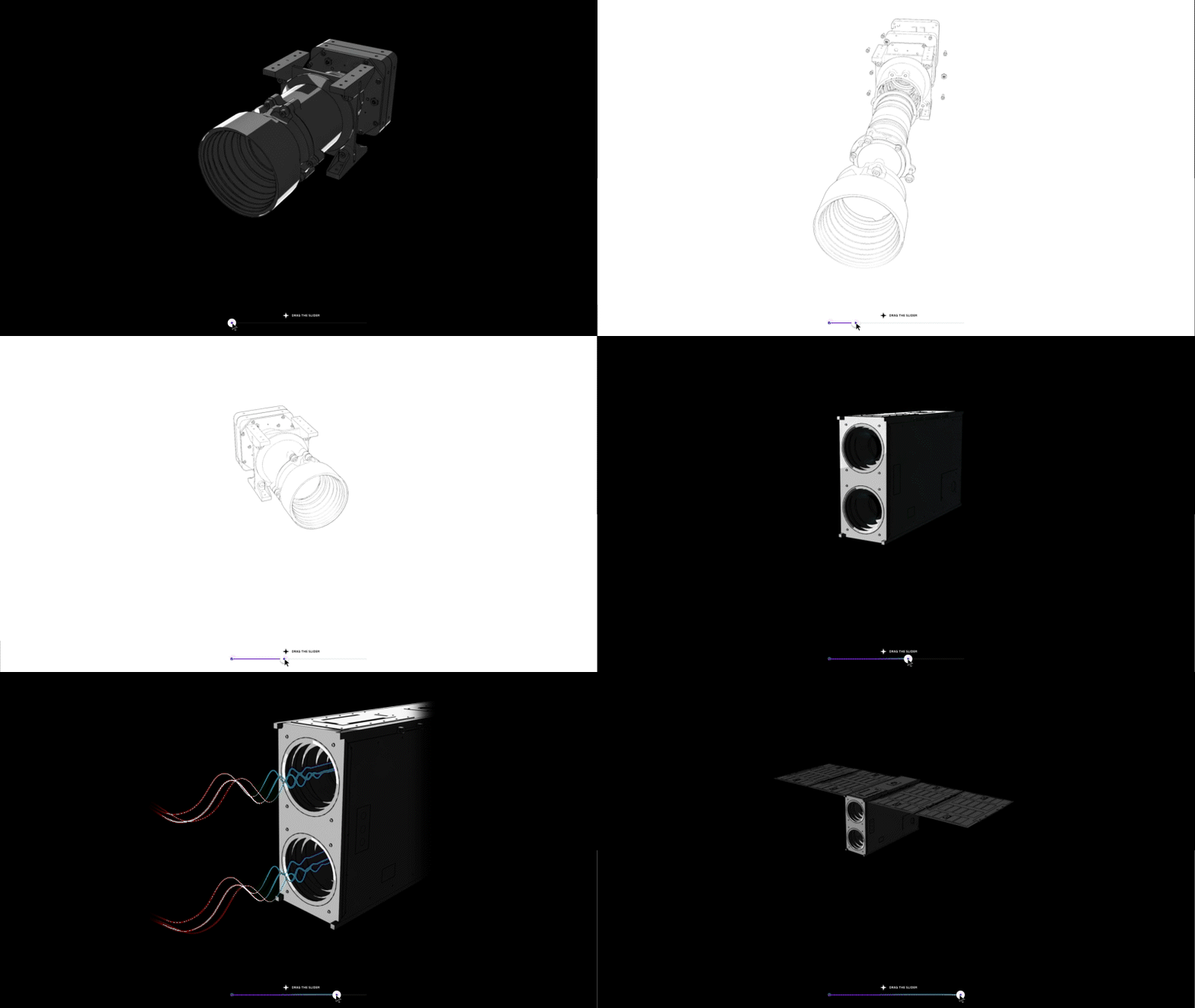
Approach 1: the progress slider
We built an elegant control bar beneath the animation: A horizontal slider that users could drag left or right. As the thumb moved, the video scrubbed in real-time.
The experience was silky smooth and extremely predictable, even on challenging mobile devices. From a performance and reliability standpoint, it checked all the boxes. But it fundamentally changed the narrative:
- Instead of the page itself being the controller, the user now had a separate control element.
- The magic link between “I scroll” and “the world responds” was broken.
We shared the prototype because it was genuinely good, and might have been perfect for another project. Digantara appreciated the craftsmanship, but was clear: they wanted scroll-based control, not slider-based.
Approach 2: guided intervals
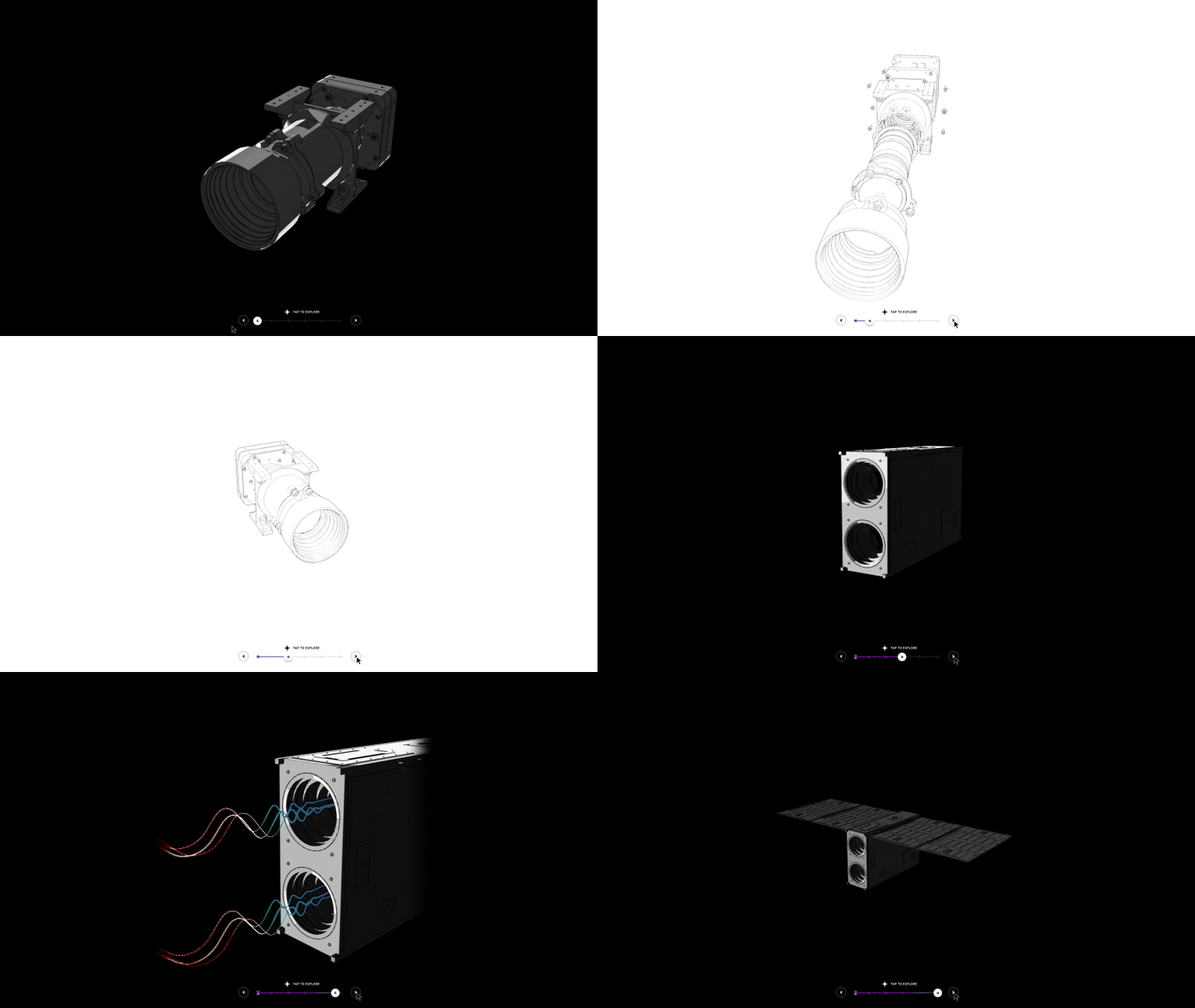
Next, we tried a “guided tour” model: Break the animation into meaningful chapters, e.g., “External view,” “Internal sensors,” “Data processing,” etc.
- Provide arrows or dots to move between these segments.
- Smoothly animate between the chapters, giving the sense of a curated walkthrough.
This version was rock-solid across all platforms. It offered excellent storytelling control and didn’t demand pixel-perfect scroll tracking. But again, it wasn’t what we collectively wanted. The client’s vision, which we agreed with, was that scrolling itself should be the conductor. Segmented navigation, however refined, always felt like a compromise.
Both approaches were “right” in typical web terms. But for this project, they were not right enough.
Back to foundational thinking: The video is a compilation of a million frames
The turning point came when we stopped thinking in terms of “a video” and instead thought in terms of frames. Old school frame by frame animation.
If we treat the animation not as a continuous movie, but as a sequence of still images, we suddenly gain far more control. Each frame is just an image, something the browser knows how to handle extremely well, even under tight performance constraints. We completely reimagined the system as a frame-by-frame renderer controlled by scroll position.
Step 1: Exploding the video into frames
- For each product animation, we exported the video into hundreds of individual frames.
- For the desktop, the longest sequence (around 20 seconds) was converted into roughly 400+ frames, carefully tuned to balance smoothness with file size.
- For mobile and tablet, we created separate frame sets with slightly different counts and resolutions, optimised for those devices’ capabilities.
Step 2: compressing everything without sacrificing clarity: To keep things fast, we converted all frames into a highly efficient modern image format.
- Tuned compression to preserve clarity where it mattered most (fine details of hardware, edges of components) while squeezing out every unnecessary byte.
- Served these frames from a fast content delivery network (CDN) so users around the world would get them quickly.
We built a system that behaves like a video, feels like a live 3D object, and performs like a sequence of images.
Step 3: mapping scroll position to exact frames: The heart of the system is a simple but powerful idea: every scroll position corresponds to a specific frame number. Conceptually, it works like this:
- Imagine the scrollable area for the animation as a long track.
- The very top of that track corresponds to frame 0.
- The very bottom corresponds to the last frame (for example, frame 300).
- Wherever the user is along that track, we calculate the corresponding frame.
- If you scroll a little, we might jump from frame 25 to frame 30. Scroll back slightly, and we show frame 28. Scroll smoothly from top to bottom, and you essentially “play” the animation at your own pace — forwards or backwards.
- This is where the “space-grade” metaphor becomes real. It’s not enough to be approximately right; the mapping has to be mathematically precise:
- A small scroll movement should always produce a predictable, repeatable change in the image.
At any point, if you reverse direction, the animation should feel like you’re rewinding, not snapping around. We built a custom scroll-tracking system that turns raw scroll movement into a clean, stable animation timeline. It factors in the height of the section, the size of the viewport, and the total number of frames, then uses that to compute the frame to display at each moment.
Step 4: pinning the scene in place: To keep users immersed, we “pin” the section while the animation plays:
As you scroll into the product section, the content appears to stop moving momentarily while only the animation progresses. In reality, the page continues receiving scroll input, but instead of moving the content, we translate that movement into frame changes. Only when the animation sequence is complete do we unpin the section and allow the rest of the page to scroll normally again. This creates the illusion that the product is floating in a stable window while you control its behaviour with the scroll.
Step 5: smart preloading and device-aware performance: To maintain the “buttery” feeling across all platforms, we:
- Load initial frames early so the first interaction never feels empty or delayed.
- Proactively fetch upcoming frames just before the user reaches them, smoothing out potential rough spots.
- Use different frame sequences and resolutions for desktop, tablet, and mobile, so each device gets an experience tailored to its capabilities.
Challenge 2#: Dynamic content: building on top of Strapi CMS
Digantara’s website is not a frozen, hard-coded experience. It’s a living platform designed to grow with the company. At the heart of this flexibility is a headless content management system (CMS) — Strapi.
Templates, not one-offs: Instead of building each product page as a unique snowflake, we created reusable templates:
- A structured layout that knows how to display hero imagery, summaries, feature breakdowns, and technical highlights.
- Dedicated zones for interactive elements — like the scroll-driven 3D sequence — that can be configured per product.
The website automatically assembles a new product page that looks and feels consistent with the rest of the site, complete with scroll animations, sticky tabs (if used), and all supporting motion.
- A future-proof animation pipeline
- Because the frame-by-frame system is also integrated into this content architecture:
- Each product can define its own frame assets.
- When new frames are uploaded, the system knows how to position, preload, and render them.
- Performance tuning rules (such as using different frame sets for desktop vs mobile) apply automatically.
This combination of dynamic content and carefully controlled animation gives Digantara a rare advantage: they can introduce new stories and products without compromising on quality or asking engineers to rebuild complex interactions from scratch.
Four months of development: R&D, dead ends, and breakthroughs
From kickoff to launch, this project spanned roughly four months. That timeline wasn’t just about building pages; it was about research and development.
We tested:
- Multiple video formats and encodings.
- Canvas-based rendering approaches.
- Techniques that offload parts of the work to background processes.
- Variations in frame counts, resolutions, and compression methods.
Building our own tools to see the invisible: To make good decisions, we needed visibility into what was really happening.
We created internal tools to:
- Measure scroll performance in fine detail.
- Visualise frame timing and detect where frames might be skipping or lagging.
- Overlay debugging information onto live pages to see exactly how scroll position, frame indices, and animation states were changing in real time.
These tools gave us the confidence to discard approaches that looked good “by eye” but fell short under scrutiny, and to double down on the frame-by-frame method when the data backed it up.
Iteration as a principle: Throughout the four months, we cycled repeatedly through a loop:
- Prototype a solution.
- Test it on real devices (not just simulators or high-end machines).
- Observe failure modes and edge cases.
- Refine, simplify, or replace the approach.
Under the hood, Digantara’s site is built on a modern web stack, but what matters most is how that stack is used.
Rather than listing tools and frameworks, it’s more meaningful to highlight the principles that guided our technical decisions:
- Server-rendered foundations: Content is rendered on the server and sent as complete HTML wherever possible, ensuring fast initial loading and improved search visibility.
- Client-side interactivity on top: Once the page is loaded, interactive layers, such as scroll-driven animations, sticky behaviours, and carousels that activate progressively. People on slower connections still get content quickly, while those with capable devices enjoy richer motion.
- Decoupled content and presentation: Strapi serves as the content backbone, while the front-end focuses on display and interaction. This separation allows the site to evolve without tying copy changes to code changes.
- Performance as a non-negotiable: Whether we were choosing how to structure a component, when to load an asset, or how to sequence an animation, we prioritised responsiveness, stability, and real-world device performance over theoretical maximum flashiness.
If we’ve done our job well, visitors will simply experience the story, effortlessly and without interruption.
They will simply:
- Scroll into a product section and feel as if they are physically opening and inspecting the device.
Watch tabs glide into place and highlight themselves exactly when the surrounding content shifts focus. - Move through full-screen sections that slide over one another like thoughtfully placed cards, each revealing a new chapter in the story.
- Notice that nothing jitters, freezes, or behaves strangely, even on their phone, over mobile data, during a busy commute.
- They’ll walk away with a deeper understanding of what Digantara does and, perhaps more importantly, a quiet conviction that this is a company that values precision and quality.
That impression is no accident. It’s encoded in every design decision, every technical trade-off, and every late-night test on a slightly outdated phone

By investing heavily in research, we’ve given Digantara a platform that can grow with them.
Words can only go so far. The best way to understand this work is to feel it. Visit the Digantara website and scroll through the product pages. If you’re exploring ambitious digital experiences of your own, especially ones that demand both rich interaction and rock-solid performance, we’d love to help you bring them to life.